Overview
All NFT items in Asylum ecosystem extends pallet_uniques and RMRK standards and inherits tranferability and extensibility. But we want also to bring gaming semantics and interoperability to items, that's why we introduced such abstractions as Blueprint and Interpretation.
Metaverse objects entities flow diagram
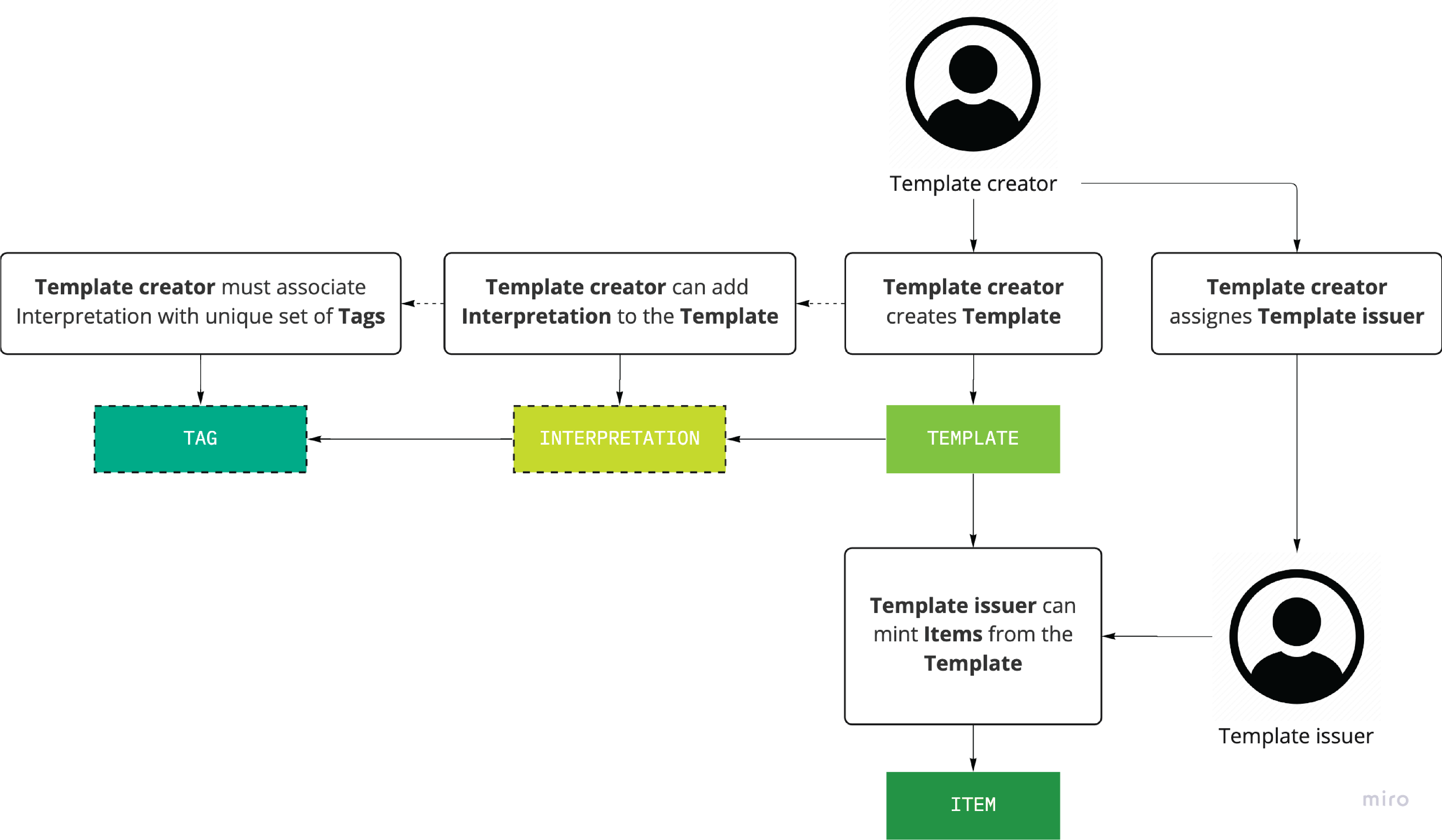
- Blueprint: The extension of the classic NFT Collection. The
Blueprinthas a set of supportedInterpretations, and all items minted from thisBlueprintsupport theseInterpretationsas well. - Interpretation: The description of the media resource, which is used to interpret the
Blueprintin different contexts. To describe such context,Interpretationmust be associated with the unique set ofTags. This set ofTagsdefines the format ofInterpretation's metadata. - Tag: The
Tagis used to give anInterpretationa special semantic, allowingClientto query specificInterpretationaccording to the context of usage.Tagcan describe a list of fields, which formsInterpretaion's metadata. - Item: The NFT minted from a particular
Blueprint.Itemhas the sameInterpretationlist, specified byBlueprintat the time of its minting, but can differ in the future with upgrading theBlueprint. The owner ofItemmight reject upgrading thisItemaccording to the latest updates ofBlueprint.
Blueprint metadata standard
Blueprint metadata currently contains only the description field and has the following structure:
{
  "name": {
    "type": "string",
    "description": "The name of the interpretation"
  },
  "description": {
    "type": "string",
    "description": "Description of the blueprint as a whole. Markdown is supported."
  }
}
You can find an example of configuring the metadata in the Asylum Node testing guide in the Blueprint section.
Blueprint metadata does not have any additional fields as all the info is stored in the Interpretations and its metadata.
Tag metadata standard
Every Interpretation in the IMP ecosystem is associated with a specific set of Tags. Consider Tags as a verbal description of Interpretation. Tags can carry interpretation metadata fields with predefined or configurable values, or even without any metadata, bringing specific semantics to the Interpretation (like the pixeled tag).
Besides the common Tag fields like id and description that are used to provide the understanding of the Tag semantics, Tag metadata also has a complex field - metadataExtensions.
metadataExtensions is the object that describes the way how the concrete Tag affects the metadata of Interpretation.
For example png tag can bring the required format field to the metadata with the default value png.
The whole structure of tag metadata:
{
  "id": "string",
  "description": "string",
  "metadataExtensions": {
      "fields": [
        {
          "name": "string",
          "type": "string",
          "default": "any",
          "description": "string"
        }
      ]
  }
}
You can find an example of configuring the metadata in the Asylum Node testing guide in the Tags section.
Interpretation metadata standard
Interpretation metadata contains only the description field but can be extended by Tags (see examples in the next section).
The structure of interpretation metadata:
{
  "description": "string",
  "tag-metadata-field-name": "tag-metadata-field-name"
}
Examples of metadataExtensions usage
Let's consider a few examples of metadataExtensions usage.
- Fist one is the
pixeledtag, which is used to define pictures in pixeled style and can bring fields likepixel-sizeorsmoothed.
Metadata of the pixeled tag:
{
  "id": "pixeled",
  "description": "in pixeled style",
  "metadataExtensions": {
      "fileds": [
        {
          "name": "pixel-size",
          "type": "number",
          "default": "",
          "description": "Size of pixeles"
        },
        {
          "name": "smoothed",
          "type": "boolean",
          "default": false,
          "description": "Is image smoothed"
        }
      ]
  }
}
Metadata of interpretations with pixeled tag:
{
  "description": "interpretation description",
  "pixel-size": 128,
  "smoothed": false,
}
- Another example is the
animation-sprite-atlastag, which is used to define an atlas for 2d animation and will bring required fields liketile-size-h,tile-size-w,tiles-count, andpadding.
Metadata of the animation-sprite-atlas tag:
{
  "id": "animation-sprite-atlas",
  "description": "sprite atlas used for the 2d animation",
  "metadataExtensions": {
      "fileds": [
        {
          "name": "tile-size-h",
          "type": "number",
          "default": "",
          "description": "Height of every tile in pixels"
        },
        {
          "name": "tile-size-w",
          "type": "number",
          "default": "",
          "description": "Width of every tile in pixels"
        },,
        {
          "name": "padding",
          "type": "number",
          "default": "",
          "description": "Padding between tiles in pixels"
        }
        {
          "name": "tiles-count",
          "type": "number",
          "default": "",
          "description": "Count of all tiles in the atlas"
        }
      ]
  }
}
Metadata of interpretations with animation-sprite-atlas tag:
{
  "description": "interpretation description",
  "tile-size-h": 64,
  "tile-size-w": 64,
  "tiles-count": 21,
  "padding": 2,
}